Coding in Peace - The Story Behind Harmonia Zen
How the pursuit of distraction-free coding led me to build an extension that respects both your focus and your preferences.
The Distraction Problem
Every developer knows the feeling. You’re deep in a complex problem, the logic is finally clicking into place, and then… a notification. A sidebar catches your eye. The minimap reminds you of that other bug you meant to fix. Your flow is broken.
VS Code’s built-in Zen Mode was supposed to solve this. Toggle it on, and the UI disappears. But I found myself frustrated by its all-or-nothing approach. Sometimes I need line numbers. Sometimes I want the minimap but not the sidebar. The binary choice felt limiting.
The Control I Wanted
I started keeping notes on my ideal setup for different tasks:
- Deep debugging: Keep line numbers and gutter, hide everything else
- Writing documentation: Minimal interface, but keep the scrollbar for navigation
- Quick edits: Almost everything visible for context
- Long coding sessions: Just the essentials, plus something to structure my time
That last point led me to the Pomodoro Technique. I’d been using it for years with external timers, but context-switching to another app always felt like a small interruption in itself.
What if my editor could handle both? A truly customizable Zen Mode, plus a built-in timer that understands the rhythm of focused work?
Building Harmonia Zen
The core idea was simple: give developers granular control over their environment.
Instead of one Zen Mode toggle, Harmonia Zen offers 17 individual controls:
- Editor elements: Line numbers, gutter, minimap, breadcrumbs, indent guides, bracket pairs, rulers
- Scrollbars: Vertical and horizontal separately
- Workbench: Activity bar, status bar, sidebar, panel, tabs
- Behavior: Cursor blinking, whitespace rendering, line highlighting
Each one can be toggled independently. Your preferences are remembered. And when you exit Zen Mode, your original settings come back exactly as they were.
Preset Profiles
But remembering 17 toggles for different scenarios? That’s its own cognitive load.
So I built presets:
| Preset | Philosophy |
|---|---|
| Minimal | Everything hidden. Pure text and thought. |
| Writer | Clean but navigable. Good for prose and documentation. |
| Focus | Keep the coding aids (line numbers, indent guides), hide the distractions. |
| Custom | Save your own configuration and recall it instantly. |
Switch between them with a single click. No friction.
The Pomodoro Integration
The Pomodoro Technique structures work into focused intervals (traditionally 25 minutes), followed by short breaks (5 minutes), with longer breaks after several sessions.
It’s simple, but it works. The rhythm prevents burnout and keeps you aware of time passing.
I built the timer directly into the extension:
- Visual indicator in the status bar showing time remaining
- Session tracking so you know which interval you’re on
- Customizable durations because 25 minutes isn’t right for everyone
- Auto-start option for continuous flow without manual intervention
The timer respects your focus. No intrusive popups—just a status bar update when your session ends.
Focus Statistics
After using the timer for a while, I wanted to understand my patterns. When am I most productive? Am I consistent?
Harmonia Zen tracks:
- Daily sessions and focus time
- Current streak and longest streak
- Weekly overview with visual charts
- All-time cumulative statistics
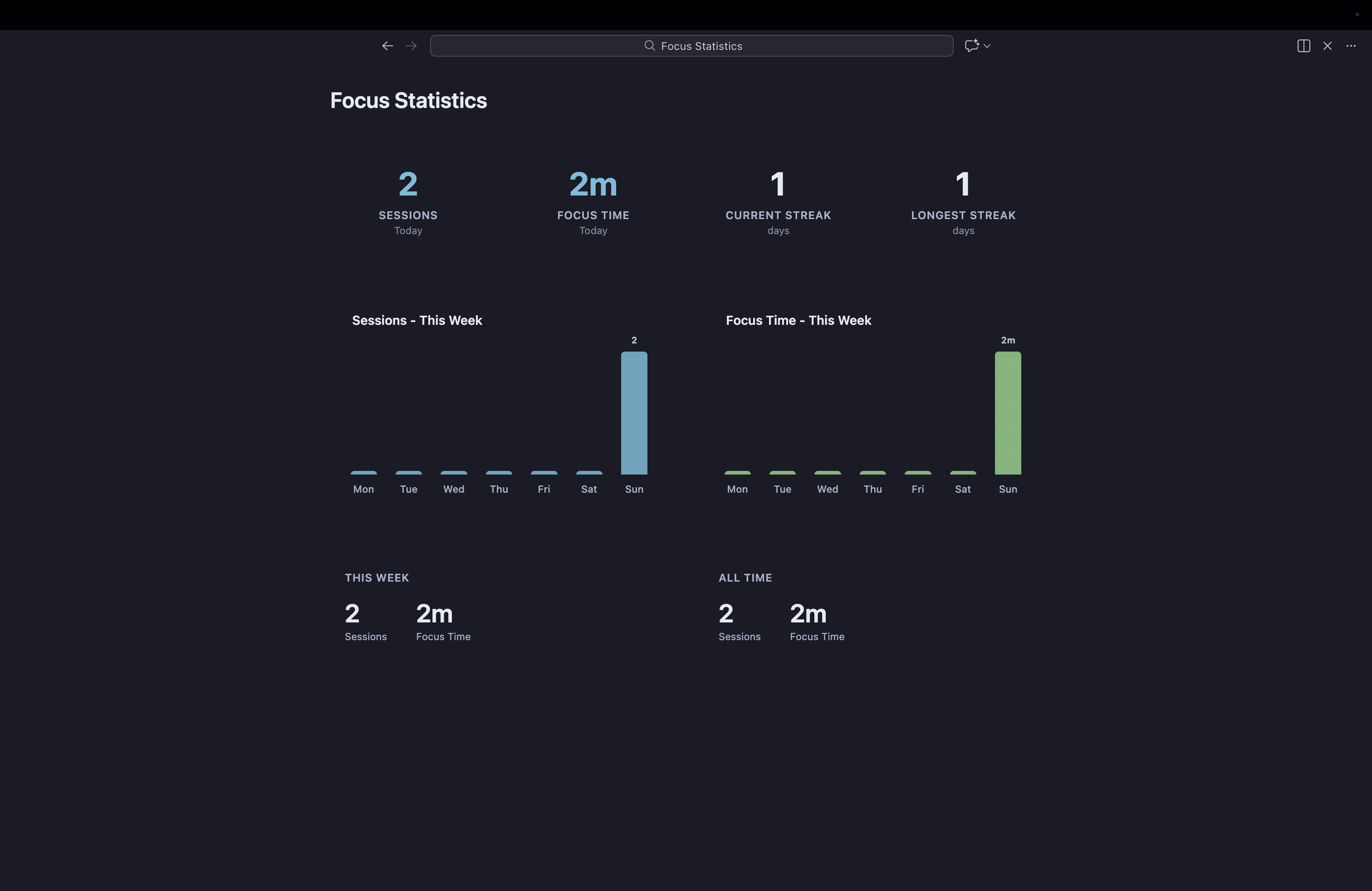
It’s not about gamification or pressure. It’s about self-awareness. Some days I notice I’ve only completed two sessions—maybe it was a meeting-heavy day, or maybe I need to be more intentional tomorrow.
All data is stored locally. No cloud sync, no analytics, no telemetry. Your productivity data stays yours.
Why “Harmonia”?
This is the third extension in the Harmonia family:
- Harmonia Theme: A color theme designed for eye comfort during long sessions
- Harmonia Vision: Typography calibration for developers with vision conditions
- Harmonia Zen: Environment control and focus management
The name comes from the idea of harmony—creating an environment where everything works together to support you, rather than fighting for your attention.
What I Hope You Get From It
If you’ve ever wished Zen Mode was more flexible, or if you’ve bounced between different Pomodoro apps looking for one that integrates with your workflow, Harmonia Zen might help.
It’s not about forcing a specific productivity system on you. It’s about giving you the controls to create the environment that works for your brain.
Some developers like minimal interfaces. Some need more context visible. Some thrive with strict time boundaries. Some prefer flowing without interruption. Harmonia Zen tries to accommodate all of these.
Privacy by Design
Like all Harmonia extensions, privacy is non-negotiable:
- No telemetry or analytics
- No external communication
- All settings and statistics stored locally in VS Code
- Open source under MIT license
Your focus is yours. Your data is yours.
Where to Find It
Harmonia Zen is available now on the Visual Studio Code Marketplace.
Thanks for Reading
We spend countless hours in our code editors. Making that environment comfortable, focused, and personalized feels like time well invested.
If you try Harmonia Zen, I’d love to hear how it fits into your workflow. What presets work for you? What Pomodoro durations feel right? Feedback helps shape future improvements.
Code in peace.